Introduction
This guide provides a detailed, step-by-step walkthrough for creating a build pipeline in Azure DevOps tailored for System1. The primary purpose of this Dev-Build Pipeline is for testing. It encompasses tasks such as compiling source code, running tests, and generating deployable artifacts.
Step 1: Task Section
-
Get Sources
Select the source of your project, for example, a Git repository.
-
Agent Job - To Build, Test, and Package the Artifact
This section orchestrates tasks to transform source code into a deployable form.
-
Restore NuGet Packages in the Solution
Ensure project dependencies are in place by restoring NuGet packages
-
Build Individual Projects in the Solution
In larger solutions, build projects independently to ensure each is ready for build without errors.
-
Use Node 14.17.0
Configure the Node version to be used since the agent might not have the desired version.
-
Run [npm install] on Admin
Install npm packages for the admin app to ensure all dependencies are available.
-
Run [npm install] on App
Install npm packages for the app to ensure all dependencies are available.
-
Replace Tokens in Admin .env.production
Replace values in the .env.production file for the admin app.
-
Replace Tokens in App.env.production
Replace values in the App.env.production file for the app
-
Run [npm build] on Admin
Build the admin app to make it ready for deployment.
-
Run [npm build] on App
Build the app to make it ready for deployment.
-
Publish Web Projects to the Artifact Staging Directory
For web apps (API, App, Admin, IdentityProvider), compile, package, and copy resulting artifacts to a staging directory.
-
Publish Console Apps to the Artifact Staging Directory
For console apps, compile, package, and copy resulting artifacts to a staging directory.
-
Archive the Built-out Artifact Staging Directory
Compress or package the contents of the staging directory into a distributable archive (e.g., zip file).
-
Publish the Archive File
Ensure the archived file is accessible for subsequent stages of the pipeline or other processes.
Step 2: Running the Pipeline
-
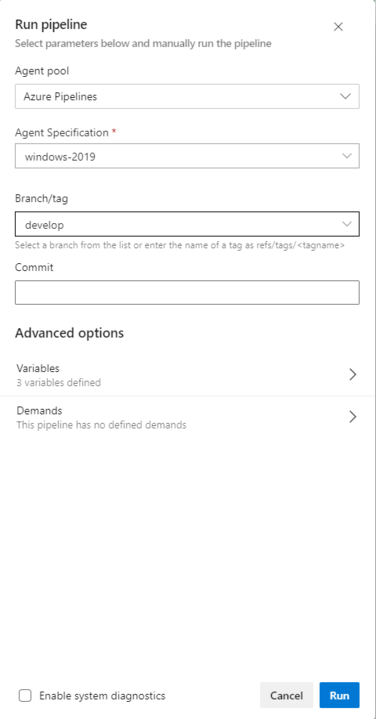
Branch Selection
Choose the desired branch for the build.
-
Initiate Pipeline Run
Run the build pipeline, triggering the defined sequence of tasks.
-
Monitor Build Execution
Monitor the build progress in the Build Pipelines section, reviewing details of each run and executed tasks.
-
Review Artifacts
Confirm that artifacts are successfully generated and stored in the specified staging directory.
-
Pipeline Completion
Once the pipeline run is complete, the application is in a deployable state.
This step-by-step guide ensures a systematic approach to building pipelines in Azure DevOps for System1, from source retrieval to artifact generation and pipeline execution. Adjustments and improvements can be made based on specific project requirements and evolving best practices.
Step 3: Dev-Release Pipeline - Deployment to End Users
Introduction
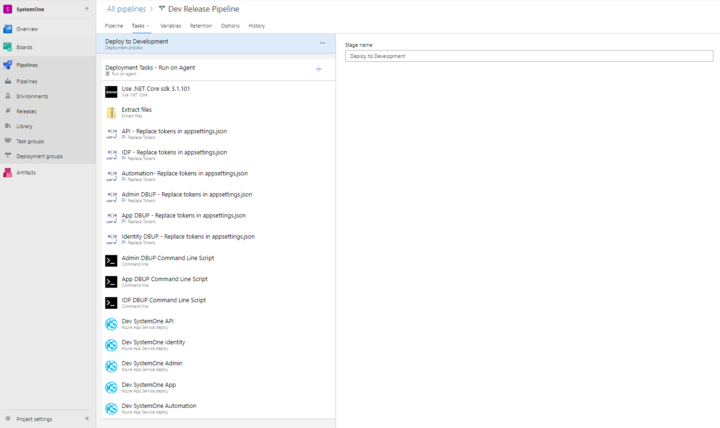
This section outlines the steps for releasing artifacts generated in the Dev-Build Pipeline to end users. The Dev-Release Pipeline focuses on deploying a tested and validated version of the application.
Release Pipeline Setup
-
Use .NET Core SDK 3.1.101
Set up the .NET version required for the release.
-
Extract Files
Extract artifact files generated in the Dev-Build Pipeline.
-
API - Replace Tokens in appsettings.json
Replace values in the appsettings.json file for the API using information stored in the Library.
-
IDP - Replace Tokens in appsettings.json
Replace values in the appsettings.json file for IDP using information stored in the Library.
-
Automation - Replace Tokens in appsettings.json
Replace values in the appsettings.json file for Automation using information stored in the Library.
-
Admin DBUP - Replace Tokens in appsettings.json
Replace values in the appsettings.json file for Admin DBUP using information stored in the Library.
-
App DBUP - Replace Tokens in appsettings.json
Replace values in the appsettings.json file for App DBUP using information stored in the Library.
-
Identity DBUP - Replace Tokens in appsettings.json
Replace values in the appsettings.json file for Identity DBUP using information stored in the Library.
-
Admin DBUP Command Line Script
Runs Admin DBUP console app to execute SQL scripts
-
App DBUP Command Line Script
Runs App DBUP console app to execute SQL scripts.
-
IDP DBUP Command Line Scrip
Runs IDP DBUP console app to execute SQL scripts.
-
Dev SystemOne API
Deploys the SystemOne API web app.
-
Dev SystemOne Identity
Deploys the SystemOne Identity Provider web app.
-
Dev SystemOne Admin
Deploys the SystemOne Admin web app
-
Dev SystemOne App
Deploys the SystemOne App web app.
-
Dev SystemOne Automation
Deploys the SystemOne Automation web app.